Choosing Language for VMware vSphere Client or vSphere Web Client
I recently worked with a client based out of Mexico. While I speak Spanish fluently, I cannot read Spanish quickly enough, nor can I write it well. In working with this client, I logged into their VMware vCenter Server, and to my shock, the UI was in Spanish. Since I have a lab environment, I opened up my vSphere Client on one monitor and the client’s vSphere Client on my 2nd monitor and referenced the English version when I could not understand the UI in Spanish. Crisis averted.
The next day, however, I started to wonder whether the UI supported a changing of the language on the fly or if it was only a one-time choice during setup. Luckily a quick Google search led me to one of VMware’s KB articles: Forcing a localized vSphere Client or vSphere Web Client installation to launch in a localized language/English.
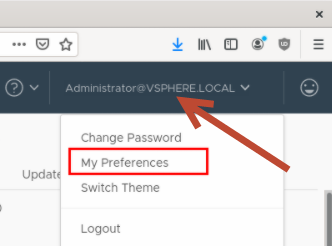
If you want to change the language, do the following: